Boost Your Marketing; 8 Ways to Explode Your Exposure

Marketing in 20138 Ways Marketing Services Can Boost Your Business


By Thomas R. Rich PhD

website and social media

The most important two marketing components for a small business, in today’s world of internet marketing, is to have a properly developed website and connected social media network.  Beyond these two components, each facet of that social media network must be properly setup and maintained.  You must also have a building and targeted email list with a regularly distributed email campaign connected to your website and social media network.

The history of MarketingThough internet marketing in any form is the hot marketing topic in many circles today, we must not forget traditional marketing methods.  Traditional marketing is at the heart of all internet marketing.  To successfully spread a consistent story and image out on your company, you must first have a professional logo, a color scheme, and a plan to integrate this logo and color design into your entire marketing world.

We cannot over look print ads, direct mail, and flyers, which are still an

print marketing

print marketing

integral part of marketing a small business today.  Also, do not discount yourself and your professional employees, grass roots marketing, networking and chamber of commerce meetings and events are all great places to expose the public to your knowledge of your products and services. All of these marketing components still figure prominently into any complete marketing plan.

Let us look at the top eight marketing services that can boost your business now:

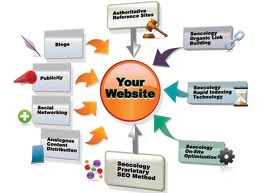
website marketing1)      A properly designed website, branded correctly, and with an active blog is the center of any well run marketing campaign.  Prominently display your logo on every page, make sure to have a great landing page, clearly list services, and have a contact us page.

2)      Have a more information now/newsletter sign-up link clearly visible to all website visitors.  Put social media sign up buttons on all pages. Pinterest, Facebook, LinkedIn, and Twitter are the four most common social media outlets.

3)      Have an active blog on your website. Make sure it is updated 2-4 times a month with informationemail marketing that stays in step with your product or service.  A blog discusses topics of interest to those who visit your specific site.

4)      Build your email mailing list through customers and prospects, website visitors, and networking events.  Use this “opt in” email mailing list to send a well-produced and targeted email newsletter.

Social Media for Marketing5)      Set up a superior social media network, including Pinterest, LinkedIn, Facebook, and Twitter.  Brand them all with your logo and colors to match your website. Fans and potential connections know they are within your sphere of influence.

6)      Actively work your social media with interconnecting messages and encourage a steadily growing fan base on all your social media network nodes.  Be active on Pinterest, making sure everything in your network is linked to your website and blog.

7)      Send out a well-written and targeted press release.  Make sure it is targeted to your core press release importantcustomer and linked to your website and social media network.

8)      Develop great collateral material for grass roots marketing and networking.  Design and print cards, tri-folds, and flyers, all with your logo and color scheme.  A well produced and professional appearance is the key. Make sure the look and feel is related to your developing brand.

Related Blogs

    Deep Rich Data and Barter Rewards Strike Big with George W. Bush Pariody Video

    George W. Bush played by John C Morgan

    George W. Bush as played by John C. Morgan

    Barter Rewards and Deep Rich Data Strike Big

    George W. Bush Parody Video Scores 78,000+ YouTube Views in 6 Days with the Thomas R. Reich Developed SEO Method!
    Reprinted from PRWeb

    On March 8, 2013, Tate Carson looked at his 3-month-old video featuring a very funny George W. Bush impersonator, John C. Morgan, and saw 311 total views on YouTube.  “Barter Rewards is one of the premier barter companies with great reach and a great website but we had no idea how to promote a video,” Mr. Carson said.

    Tate decided to try the new social media protocol called “Deep Rich Data” which has been getting some buzz lately.  Thomas R. Reich, developer of Deep Rich Data said, “I come from a music industry background; in the past I promoted INXS, WHAM, Debbie Gibson, Yes and 60 other gold and platinum successes.”  Reich continued, “We used taste makers

    George W. Bush impersonator with Jeb Bush

    Jeb Bush with John C. Morgan as George W. Bush

    and key stores back in the 90’s, I found a way to incorporate key social media nodes to effect the same result.”

    By Monday March 11, 2013, the video “21st Century Trade Exchange” had 3400+ hits; it started to get noticed. By Wednesday, total YouTube views hit 40,000+ and on Thursday March 14, the number topped 78,000. Reich iterates, “It reminds me of the old days of the music industry really, if a product was good, you got it noticed and it took care of itself. This is a great video.”

    Tom Reich, Marketing Director for BizCentral USA explains that the key to any successful promotion is a great product.  “The video follows the cardinal rules of YouTube success.” Reich continues, “It is under 1 minute, funny, has accomplished talent, written well and represents a respected product.”

    Tate Carson, founder of Barter Rewards said, “We were looking for a funny but wholesome spokesman for Barter Rewards. John C. Morgan fit the bill, he is the best Bush impersonator out there, and I think some may think it’s really him. It’s all in good fun.”

    Mike Huckabee and John C. Morgan as George W. Bush

    Mike Huckabee and John C. Morgan as George W. Bush

    “I’m a Barter Rewards member myself so the fit was great,” said Orlando based actor John C. Morgan. “I will not bring George out for anything mean spirited. This was good natured and all in good fun. You can feel Bush’s values of love, country, God and family behind the jokes.”

    “The key to making a video hit with big views using the Deep Rich Data method is the same as it ever was,” said Thomas R. Reich who was CEO of Cheetah Records in the 90’s, “one part talent, one part good product, one part promotion and one part luck.”

    Barter Rewards is an international barter company, for more information on the Barter Rewards programs call 407-251-0980.

    Mitt Romney and John C. Morgan as George W. Bush

    Mitt Romney and John C. Morgan as George W. Bush


    Related Blogs

      How Deep Rich Data Works as a Traffic Generator

      how to use deep rich dataHow Deep Rich Data Works as a Traffic Generator


      The newest traffic generator DRD or Deep Rich Data was developed by Thomas R. Reich PhD to help clients with sluggish websites and landing pages.  With Deep Rich Data methods, even dull or mundane subjects become search magnets.  The coolest thing about DRD is that the system is not a gimmick, not a fancy program, or a get rich quick MLM scheme.


      DRD is a simple concept that works with Pinterest and Twitter to promote blogs, website pages, YouTube videos, landing pages on FaceBook and LinkedIn, just about anything with a URL.  It is a straight forward method that how to use deep rich datatakes time and patients but delivers results that are undeniable.


      The system not only delivers Pinterest traffic from the Owners Pinterest site but from every Pinterest repinner as well, and all the Twitter activity and retweets as well.  But the real boost to traffic does not involve either Pinterest or Twitter, it is traffic generated from organic Google and Bing searches, primarily image searches, but since DRD uses rich snippets, the organic search goes to regular organic search as well.


      how deep rich data worksTo use Deep Rich Data properly, the originator needs to fully understand Pinterest and Twitter. The website must have a fully enabled Pinterest site with multiple boards which have been SEO optimized for that website. Also, a fully enabled Twitter site is needed, with at least 1000 true followers.  All these together will allow DRD to help disseminate the message and stimulate the organic search properties.


      Let’s say a company is promoting a special sale on floor cleaning in Orlando Florida, obviously leads from California are not desirable.  At the same time if a company was promoting a new kitchen aid for peeling a papaya, it would want as wide an area of leads as possible since the company would be shipping the item anywhere rather than servicing locally.  Deep rich Data can work for either situation with equal efficacy.


      The basic foundation of DRD is the SEO of an organization’s Pinterest site.  SEO must be in place and pointed how deep rich data workseither to the product or service.   If dealing with a local product, use random local, city and state as descriptor words in the SEO.


      Back links are also a key element of Deep Rich Data, they work to direct the picture to selected locations within the target website or desired landing page.  Without the URL re-direct, the system will not work.  Just creating a clear SEO path is not enough, a picture must have a URL redirect for DRD to function as a mass Lead generator.


      Use Deep Rich Data for:


      •           Event Announcements

      •           Specific Products

      •           Specific Services

      •           Regional or Local Re-directs

      •           Website Landing Pagehow deep rich data works

      •           Website Home Page

      •           Specific Page within the Website

      •           FaceBook or LinkedIn page

      •           Video (YouTube or Vimeo)

      •           Recorded Webinar or Seminar


      The direct point is not a factor; anything with a URL can be specifically and definitively programmed in advance.  The key to Deep Rich Data method success is the SEO and key word selection and careful selection of the pictures on the Pinterest boards. Keywords are the crucial to credible traffic.  Remember that due to the Pinterest file share rules, the pictures that cause the re-direct of traffic do not necessarily come from the target website or any specific location associated with the target.


      how does deep rich data workDeep Rich Data is in its infancy, growing daily and becoming more viable with each new success.  Have questions or suggestions, let us hear from you, together we can make Deep Rich Data a tool for greatness, it’s worth the effort!


      Related Blogs

        Deep Rich Data, Taking Social Media to the Next Level

        DRD or Deep Rich DataDeep Rich Data, Taking Social Media to the Next Level


        Reprinted from Newsday


        A new term, coined by Thomas R. Reich PhD Marketing Director for BizCentral USA, is now recognized in Wikipedia. It refers to a method of SEO delivery associated with Pinterest, which connects pictures to a given online media network and selected blog.


        The traffic Deep Rich Data (DRD) brings to a well-constructed online media network is beyond what simple rich data has done in the past. Using DRD, a picture can be“Pinned” to a Pinterest board, and after the multi level SEO of DRD is applied,

        that picture shows up on multiple search engines under image search, as well as connected to its URL link or whatever associated link is applied to the base level.Deep Rich Data


        Tom Reich of BizCentral USA, a national business services company commented on DRD, “Deep Rich Data combines many of the properties of Rich Data, with the multi levels of SEO which can be achieved by originating a picture on a blog, “Pinning’’ it to Pinterest from the blog itself, then using three levels of SEO within Pinterest and re-posting the same picture from Pinterest to a given marketing media network.”


        Reich continued, “By linking the image over and over, and having the image originate in a specific blog, the traffic generated is far greater than simple Rich Data linking.”


        Deep Rich DataTate Carson of Barter Rewards, an international barter company reacted, “We have seen our leads from Pinterest go from negligible to almost 45 percent of our entire traffic, whatever Tom is doing seems to be getting us followers by droves in Pinterest as well; it just keeps growing.” Barter Rewards, a client of BizCentral USA for some time, has a great website and a well-organized online media network.  Tom Reich has been using the Deep Rich Data with their accounts for some time.


        Dr. Reich added, “To work within the confines of DRD SEO you must have an active online media network, social media network and a very active blog.”


        Don Bruno of ITEX added, “Whatever it is Tom and BizCentral USA is doing, I see my pictures everywhere, and they all lead back to my site!”  ITEX is another account Tom is using Deep Rich Data in conjunction with a measured website, social media and blog design.


        Deep Rich Data is a new trend, setting new standards in the ever changing world of online media. Reich has been using this system for some time, but is now beginning to incorporate it into customer accounts with great results.


        Deep Rich Data or DRD is a new trend in social media SEO and link-building that is drastically increasing search results for targeted websites and blogs. Thomas R. Reich  Marketing Director of BizCentral USA developed DRD or Deep Rich Datathe deep search technique while experimenting with Pinterest.

        Related Blogs

          Start a Business in 2013: Here are the Top 10 Tips to Follow!

          start a businessStart a Business in 2013: Here are the Top 10 Tips to Follow!

           By Thomas R. Reich PhD

          Are you ready to start a business in 2013? A new venture can be an exciting prospect, but your success depends on 10 simple pieces of advice. Millions of men and women have had a dream to start a business and have done so successfully.  Most have one thing in common, planning.  The more prepared you are the better your chances of success.

          You have heard many statistics about starting a new business; some cover the failure rate and some the success rate.  Common sense will tell you the following 10 tips can help you be a new business winner in 2013.

          TIP #1:  Right up front, make sure what you are about start a business, what do you love, and what you are willing to devote you life and your passion to for a long time.   Remember, running a start a business in 2013business takes a lot of time, energy and effort. Building it into a successful enterprise will require even more effort. Since you need to put a lot into your business, you better make sure that you love what you are going to do to make it easier and more fulfilling. Besides, doing something you love means you already have a head start.   Being familiar with your product or service eliminates much of the steep learning curve that first-time entrepreneurs normally encounter.

          business planTIP #2: Put together a proper business plan; this is a must when you want to start a business.  To get a loan, to speak intelligently to government agencies, investors, suppliers and even key potential employees, you need a complete business plan.  A well structured business plan should include the following:

          • Details about your business (e.g. corporate structure, number of employees if any).
          • A marketing plan that specifies minutiae like pricing, product/service details and promotion strategy.
          • An operational plan, which describes supply chain requirements and staffing needs.
          • A financial plan that goes over current financing and cash flow projections.
          • A risk analysis that analyzes market operational, staffing and management risks.
          • And so much more to be truly a complete representation of your intentions as a business owner and developer.

          TIP #3:  Research. Research. Research. You have already done a lot of research for the creation of your business plan, but the work does not stop there when you start a business.  Every aspect of your new do your research when starting a businessbusiness should be researched, who is in the area, is your potential office or store convenient, what about your colors and logo; do your potential customers react positively?  You know from your business plan that there is a need for your business, now micro-define your research.

          TIP #4:  Get your legal house in order; make sure you understand what it means to be a business owner and start a business, your legal responsibilities to your employees and suppliers.  Make sure you have properly formed the business entity, and that you understand the local state and federal regulations that may affect your particular business.

          business graphicsTIP #5:  Work with a professional to create a well thought out logo and graphics package that gets attention and represents who you are when you start a business.  Even before you open your doors you need to be building your reputation and image through your logo and graphics package, and make sure you have a standard color package, which carries through all you do.

          TIP #6:  Have a full online presence even before you open your doors.  The nature of business today is the Internet.  You need a fully operating business website when you start a business, fully branded and using the colors and logo you developed in tip #5.  Make sure to register this website to all local directories and as soon as you get a physical location, register both the location and your website to Google maps and all local directory services.

          TIP #7:  Have a full social media presence, including Pinterest, Twitter, social media for small businessFacebook (including a business page for each distinct product or service), a fully filled out and implemented LinkedIn, and any other sites you can find.  Brand everything you can when you start a business with your logo, graphics and colors.  Make sure you are creating a network of social media that is funneling back to your website and eventually your business.

          TIP #8: Have a YouTube presence; create a simple video about you and your mission when you start a business.  You may have access to training videos made by the manufacturer of the products you are representing, or training videos of a service you are providing, make sure these videos are fully branded to you and your new business.  YouTube is the largest search engine in the world; make sure you are a part of it!

          TIP #9:  Always be professional in everything you do.   From the minute you begin to start a business and talk about your dream and begin be professionalplanning, you need to represent the character you want your business to project.  If you go to training or a meeting, you are representing your business, dress and act accordingly.

          TIP #10:  Hire professionals to help you start a business every step of the way.  Have you spent your life creating graphics and logos? Probably not; so why think something that important can be produced from thin air?  Use professionals to help you create a stunning business plan; again have you done one before?  Using professionals saves time and money, if you have an amateur business Hire bizcentralusa to help your new businessplan, who will respect you or invest with you?  If you need a delivery van you aren’t going to build it yourself, you let the pros at GM or Ford do it; same thing with business services, let the pros make you shine!

          Related Blogs

            Things to get You Noticed! 7 Free Pinterest Tools

            Pinterest Tools Things to get You Noticed!  7 Free Pinterest Tools


            Pinterest is fast becoming one of the biggest social media sites in the world and this means it is important to find its uses to expose your busines. The Pinterest tools contained in Pinterest can let you easily share any photos you find on the almost any website and socialize with anyone in the world through Pinterest. It makes sharing easier, and you can gain exposure with many more people who share your interest.

            Pinterest tools are not just for image-sharing, u can even study your social activity and find out your score on Pinterest, so you’ll know how well your message is getting out, or by using a simple web application, find out how your social activity can potentially benefit you.

            Here you will find 7 useful Pinterest tools you can use with your Pinterest from analyzing your pinterest activity to study your score and influence, pinning quotes, adding additional button as well as activity column on Pinterest page.

            1. Pinpuf

            Pinpuff is a Pinterest tools where you can calculate your Pinfluence, a measure of your popularity on Pinterest and it also provides the value of your every pin. To get started with your analytics on Pinpuff, go to the website Pinterest tools to help make you better exposedhttp://pinpuff.com/  and fill in your email and your Pinterest username, then click on the button ‘Calculate your Pinfluence’.

            You will be redirected to your pinfluence page, where you will find your pinterest analytics.

            In the score page, you will be presented with your total score at the right hand sidebar next to your Pinterest profile image. You will also get to know an estimation of your pin valuation as well as cost per click. Apart from that, you will see your reach score based on your follower and activity score.  It is just for fun but gives you an idea of how you are doing getting attention with your pins!

            There’s also a virility score, and you can also find out the total followers, pins, repins and likes of each board you created in Pinterest.

            Pinterest tools2. Pinreach

            Similar to Pinpuff, Pinreach is a Pinterest tools that also provides you with analytics to study your influence on Pinterest except without the value estimation you can find in Pinpuff. It does however have othe features to offer.

            To use Pinreach, visit the website and click on the ‘Sign Up’ button and fill up the registration form together with your Pinterest username.


            When registration is completed, you will be redirected to your analytics page. There are four tabs available on Pinreach to study your Pinterest tools activity in details.

            Analytics

            The first tab ‘Analytics’ is where you will be able to see your total pins, repins, likes, followers and more from the right sidebar, and you will also see graph of your score as well as activity changes since you last login to Pinreach.


            Boards

            Boards will show you the total number of pins, repins, followers and comments based on boards you created on Pinterest.


            Pins

            The Pins tab will show you a collection of your popular pins on pinterest.


            Influential Followers

            This tab will let you know who are among your followers has a strong influence on Pinterest. You can also click on their image to find out their Pinreach.


            Pinterest tools 3. Pin A Quote

            Pin A Quote is a set of Pinterest tools that allows you to post a quote to Pinterest. Although this is just a small part of what you can get from Pinstamatic, Pin A Quote makes it easy with their bookmarklet – you can simply post a quote by highlighting a text on any website much like how you Pin an image from a site.

            To grab the bookmarklet, visit the Pin A Quote homepage, drag the button ‘Pin A Quote’ to your browser’s bookmark bar, and it is ready for use.


            To pin a quote to Pinterest, all you need to do is simply highlight any sentence or quote you found on any website, then click on the Pin A Quote bookmarklet. A form will appear, fill it up and post it to your Pinterest.


            4. Pin Search

            Pin Search is an extension for Chrome browser and is a set of Pinterest tools that will let you easily find more related photos and information of a photo you found on Pinterest.Pinterest tools

            To start using, head over to the Pin Search extension page on your Chrome browser and click ‘Add to Chrome’.

            Once added to Chrome, open the Pinterest website and you will see an additional ‘Search’ button at the bottom of the ‘Comment’ button, when you hover over any images on Pinterest.

            Clicking on this ‘Search’ button will direct you to a Google’s search results page that is related to the image you selected.

            5. Recent Activity Expander

            Also an extension for Chrome, Recent Activity Expander is a set of Pinterest tools that will add an extra column on the left side of your Pinterest page, and list down all recent activity related to your account. It allows you to see who has followed and repinned your items since your last login.

            To start using, head over to Recent Activity Expander‘s Chrome extension page and add it to your Chrome. Once added, open Pinterest website and you will see your Recent Activities in a column on the left.

            Pinterest tools to help make you better exposed6. Pinterest Right-Click

            Pinterest Right-Click is an extension for your Firefox browser, it adds an additional right-click item to your right-click menu so you can pin any photos you found on the Internet.

            To get this Pinterest tool, open the Pinterest Right-Click extension page on your Firefox and install.

            Now when installation is completed, you can search or browse any images from your Firefox, and when you find any photos you want to pin to Pinterest, right-click on the image and select ‘Pin image’.

            When you selected ‘Pin Image’, as usual a popup window will appear for you to fill up the details of the image, which board you want to post the image to etc. Once completed, select ‘Pin it’.


            7. Pinterest Pro

            Pinterest Pro is another set of Pinterest tools for Chrome extension that comes with 3 main features to enhance your Pinterest experience: ‘Pin to Pinterest’ accessible by the right-click menu, image zooming and ‘Popular Pin Dropdown’.Pinterest tools to help make you better exposed

            You can have these features on your Chrome browser by installing Pinterest Pro from the extension page. To pin a photo, just select ‘Pin to Pinterest’ by right click. A new tab will appear; fill up with the details of the image and it will be posted on your Pinterest board.

            When you browse a Pinterest page, you can enlarge every pinned image without having to click on that image. Simply hover over any image with your cursor and the image will be enlarged.

            The third feature is the Popular Pin Down button you can find at the top-right corner of your browser. Click this button to check out the latest popular content on Pinterest without having to load the website.

            Conclusion

            Now with these 7 Pinterest tools, you can start to analyze your social activity on Pinterest and do more research on how to reach your audiences or grab more influence that would be beneficial for Marketing your product, service or event.


            Related Blogs

              Nonprofit Marketing; 15 Best Low Cost Marketing Ideas for 2013

              nonprofit marketing low cost marketing ideas

              Nonprofit Marketing; 15 Best Low Cost Marketing Ideas for 2013

              By Thomas R. Reich PhD

              Nonprofit Organizations can benefit greatly in 2013 from improved marketing plans.  Many charity directors don’t see the need for a cohesive marketing plan, they think marketing is expensive and for larger nonprofits.  Let’s look at low cost marketing ideas that can really boost your organization in 2013.

              To make this work, remember that in the past, most every nonprofit organization bought yellow page adds.  The yellow pages are dead, but good marketing replaces its exposure, without some of the low cost marketing ideas discussed here, charities may be seriously underexposed.nonprofit low cost marketing ideas

              1)     Your first low cost marketing idea is to create and maintain a good functioning organization website.  Your website is you’re on line office, your virtual spot for donations, the first impression many potential donors and volunteers have of your organization and yes, it is your new yellow page add.  Your website should also be an information resource for your cause and services.


              nonprofit low cost marketing ideas2)     Develop a new brand identity; this low cost marketing idea may be easier than you think. How long has it been since you’ve updated your website or marketing materials? Maybe it’s time to take a fresh look and redesign your image, take advantage of the digital domain. Donors and volunteers respond to new ideas and information which has been optimized for the internet.


              3)     Survey existing donors, a low cost marketing idea which is easier than you may think. How do your volunteers feel about your cause and services? Stay in touch through informal lunches or a professionally coordinated survey campaign. A survey is an excellent method for taking the pulse of your audience. The survey should include detailed questions about your cause and services and how they directly benefit the community.


              4)     Make a list of your strengths; this can be another low cost marketing idea generator. Are you the cause leader in your area? Is your organization the most experienced? nonprofit low cost marketing ideasDo you have the highest quality service? Try to list between 50 and 100 different and measurable strengths. This is a great exercise to develop new ideas for your marketing campaigns


              5)     Now time for an easy, low cost marketing idea, one you need to do now!  The donor is always right… always. The time to prove this statement is when the donor experiences a problem with your cause or service. Make a point to take responsibility and solve any problems that a donor or volunteer might have immediately. Satisfied associats turn into repeat, long-term donors and supporters.


              nonprofit low cost marketing ideas6)     This next tip is a low cost marketing idea if it helps you with the previous two ideas.  Take a large donor out to lunch. Now is the time to ask a reliable donor out to lunch. Touch base with them to see how your organization is solving problems and meeting their needs and expectations.


              7)     Well here is the cost, though still a low cost marketing idea if you follow these guidelines.  Establish an annual marketing budget. A good rule-of-thumb estimate for your marketing budget is 3% to 5% of annual revenues. Organizations that sell products or services need to budget 7% to 10% of annual sales for their marketing budgets. Your budget should include a breakdown of all marketing costs including printing, social media, website maintenance and advertising and sponsorship placement.


              8)     Here is a very low cost marketing idea, but arguably the most important you can consider.  Be positive in your outlook. It’s important to feel good about nonprofit low cost marketing ideasyourself and enjoy what you do for a living. If you have a positive attitude about your job, you will succeed by transferring that enthusiasm to other employees, donors and prospective volunteers.


              9)     *****A low cost marketing idea should always look at social media.  Pinterestis one of the newest and most effective parts of a social media exposure for your program.  You can find out more in these articles:

              How to Make Pinterest Work for You


              nonprofit low cost marketing ideas10) *****Low cost marketing idea #10 is to establish and maintain a good active Twitter account.  To learn more about Twitter and how to make it effective for your orginazation, check out these suggestions:

              45 Secrets of Driving More Donations through Social Media


              11) *****Moving along with low cost marketing idea #11 have you fully updated your LinkedIn account on a regular basis?  You must be at 100% on your profile, as a Director of a nonprofit organization you need to update every week, you need an organization page.  Want to know more, take a look at:

              LinkedIn for Nonprofits; the Lists for Action Now!


              12) *****Don’t forget another social media low cost marketing idea, have an active and constantly updated Facebook account and organization page.  Learn more here:

              Want More Visitors? Use Social Media to Drive Visitors Home!


              13) *****We talked about your Website but another low cost marketing idea is to have a very active blog attached to your website. Learn more here:

              The fundamentals of social media engagement; common sense, not tips and tricks.

              nonprofit low cost marketing ideas


              14) *****The best low cost marketing idea I can give you is this.  Learn how to connect your website, blog, Twitter, Facebook, LinkedIn, Pinterest, YouTubeand any other social media fads that appear in 2013 into a network.  Learn how to use back links and directories.  The more you work on your on-line presents, the more your organization will benefit!

              3 Must Do’s in Your Social Media Network; Making Your Organization Relevant in Social Media


              15) Here is your top low cost marketing idea for 2013; in fact it is the most important idea you will hear in regards to marketing.  In order for anything we have talked about to truly succeed, you need to develop a solid marketing plan!  You need a road map, a plan to keep you on track to sustainable goals, and a ruler to judge your success.  Part of this plan should include your established budget and an ongoing record of each facet of your marketing plans success to determine what worked and what to rethink.  All low cost marketing ideas are successful if you learn and grow from them.


              nonprofit low cost marketing ideasBonus Low Cost Marketing Idea: Consider hiring a marketing company to help you with a complete formula, if marketing is not your thing.  A firm that does marketing for lots of companies can often deliver a great marketing campaign at a very low cost compared to struggling with a part of running a nonprofit organization that can confuse many.  Be careful, there are a lot of firms that clam to know what they are doing, hire a firm that trains you to maintain your marketing plan.

              With low cost marketing idea generating help, a good digital identity, a well branded nonprofit organization and attention paid to your donors and beneficiaries’ needs, success will be yours in 2013!

              Related Blogs

                Pin It

                7 Free Pinterest Tools; Things to get You Noticed!

                Pinterest tools7 Free Pinterest Tools; Things to get You Noticed!


                Pinterest is fast becoming one of the biggest social media sites in the world and this means it is important to find its uses to expose your busines. The Pinterest tools contained in Pinterest can let you easily share any photos you find on the almost any website and socialize with anyone in the world through Pinterest. It makes sharing easier, and you can gain exposure with many more people who share your interest.

                Pinterest is not just for image-sharing, u can even study your social activity and find out your score on Pinterest, so you’ll know how well your message is getting out, or by using a simple web application, find out how your social activity can potentially benefit you.

                Here you will find 7 useful tools you can use with your Pinterest from analyzing your pinterest activity to study your score and influence, pinning quotes, adding additional button as well as activity column on Pinterest page.

                1. PinpufPinterest tools to help make you better exposed

                Pinpuff is a Pinterest tool where you can calculate your Pinfluence, a measure of your popularity on Pinterest and it also provides the value of your every pin. To get started with your analytics on Pinpuff, go to the website http://pinpuff.com/  and fill in your email and your Pinterest username, then click on the button ‘Calculate your Pinfluence’.

                You will be redirected to your pinfluence page, where you will find your pinterest analytics.

                In the score page, you will be presented with your total score at the right hand sidebar next to your Pinterest profile image. You will also get to know an estimation of your pin valuation as well as cost per click. Apart from that, you will see your reach score based on your follower and activity score.  It is just for fun but gives you an idea of how you are doing getting attention with your pins!

                There’s also a virility score, and you can also find out the total followers, pins, repins and likes of each board you created in Pinterest.

                Pinterest tools2. Pinreach

                Similar to Pinpuff, Pinreach is a Pinterest tool that also provides you with analytics to study your influence on Pinterest except without the value estimation you can find in Pinpuff. It does however have othe features to offer.

                To use Pinreach, visit the website and click on the ‘Sign Up’ button and fill up the registration form together with your Pinterest username.


                When registration is completed, you will be redirected to your analytics page. There are four tabs available on Pinreach to study your Pinterest activity in details.

                Analytics

                The first tab ‘Analytics’ is where you will be able to see your total pins, repins, likes, followers and more from the right sidebar, and you will also see graph of your score as well as activity changes since you last login to Pinreach.


                Boards

                Boards will show you the total number of pins, repins, followers and comments based on boards you created on Pinterest.


                Pins

                The Pins tab will show you a collection of your popular pins on pinterest.


                Influential Followers

                This tab will let you know who are among your followers has a strong influence on Pinterest. You can also click on their image to find out their Pinreach.


                Pinterest tools 3. Pin A Quote

                Pin A Quote is a Pinterest tool that allows you to post a quote to Pinterest. Although this is just a small part of what you can get from Pinstamatic, Pin A Quote makes it easy with their bookmarklet – you can simply post a quote by highlighting a text on any website much like how you Pin an image from a site.

                To grab the bookmarklet, visit the Pin A Quote homepage, drag the button ‘Pin A Quote’ to your browser’s bookmark bar, and it is ready for use.


                To pin a quote to Pinterest, all you need to do is simply highlight any sentence or quote you found on any website, then click on the Pin A Quote bookmarklet. A form will appear, fill it up and post it to your Pinterest.


                4. Pin Search

                Pin Search is an extension for Chrome browser and is a Pinterest tool that will let you easily find more related photos and information of a photo you found on Pinterest.Pinterest tools

                To start using, head over to the Pin Search extension page on your Chrome browser and click ‘Add to Chrome’.

                Once added to Chrome, open the Pinterest website and you will see an additional ‘Search’ button at the bottom of the ‘Comment’ button, when you hover over any images on Pinterest.

                Clicking on this ‘Search’ button will direct you to a Google’s search results page that is related to the image you selected.

                5. Recent Activity Expander

                Also an extension for Chrome, Recent Activity Expander is a Pinterest tool that will add an extra column on the left side of your Pinterest page, and list down all recent activity related to your account. It allows you to see who has followed and repinned your items since your last login.

                To start using, head over to Recent Activity Expander‘s Chrome extension page and add it to your Chrome. Once added, open Pinterest website and you will see your Recent Activities in a column on the left.

                Pinterest tools to help make you better exposed6. Pinterest Right-Click

                Pinterest Right-Click is an extension for your Firefox browser, it adds an additional right-click item to your right-click menu so you can pin any photos you found on the Internet.

                To get this Pinterest tool, open the Pinterest Right-Click extension page on your Firefox and install.

                Now when installation is completed, you can search or browse any images from your Firefox, and when you find any photos you want to pin to Pinterest, right-click on the image and select ‘Pin image’.

                When you selected ‘Pin Image’, as usual a popup window will appear for you to fill up the details of the image, which board you want to post the image to etc. Once completed, select ‘Pin it’.


                7. Pinterest Pro

                Pinterest Pro is another Pinterest tool for Chrome extension that comes with 3 main features to enhance your Pinterest experience: ‘Pin to Pinterest’ accessible by the right-click menu, image zooming and ‘Popular Pin Dropdown’.Pinterest tools to help make you better exposed

                You can have these features on your Chrome browser by installing Pinterest Pro from the extension page. To pin a photo, just select ‘Pin to Pinterest’ by right click. A new tab will appear; fill up with the details of the image and it will be posted on your Pinterest board.

                When you browse a Pinterest page, you can enlarge every pinned image without having to click on that image. Simply hover over any image with your cursor and the image will be enlarged.

                The third feature is the Popular Pin Down button you can find at the top-right corner of your browser. Click this button to check out the latest popular content on Pinterest without having to load the website.

                Conclusion

                Pinterest tools to help make you better exposedNow with these 7 tools, you can start to analyze your social activity on Pinterest and do more research on how to reach your audiences or grab more influence that would be beneficial for Marketing your product, service or event.

                Related Blogs

                  Pin It

                  45 Secrets of Driving More Donations through Social Media

                  Driving More Donations through Social Media45 Secrets of Driving Donations through Social Media

                  by Thomas R. Reich


                  You have wondered what social media can do for your nonprofit, but more important, how can you get more donations through social media?  I speak far and wide on the benefit to small business of social media, and having a proper social media network attached like a funnel to your website and blog.  But what if this same type of network is used in a nonprofit organization, can you get more donations through social media networking? Read on and be surprised!


                  Used together in a network, more donations through social media can be achieved, especially when connected to an effective blog and website pages that act as landing pages which are donor friendly, in other words, a page on your website that clearly states your cause, how the visitor can help, and a click here to donate button.


                  Let’s have some fun looking at each facet of social media, your website, and blog, and together discover many ways to get more donations through social media!Driving More Donations through Social Media


                  YouTube, Twitter, LinkedIn, Pinterest, Blogs and your website all have their place but when tied together they become a powerful tool to get potential donors to your website and help create more donations through social media.


                   Driving More Donations through Social MediaFirst let’s look at Twitter:


                  1)      It is important to have as many targeted followers as possible for Twitter to be effective.  Take a look at:

                  Top 10 Mistakes You Must Avoid when Starting a Nonprofit Organization

                  2)      Use Tweepi or another free service that is discussed at length in this blog:

                  9 free Twitter application Reviews to Clean up Your Twitter Stream

                  3)      Add @ symbol to share content of a respected site in your field and give your tweet more credibility, example: @charitynetusa

                  4)      Automate the tweeting of other sites that you respect to bring more content to your Twitter site.

                  5)      Automate your Tweeting so it is consistent at a certain time, using SocialOomph, Rooster, HootSuite or other services.  This will help bring more donations through social media.  Read more:Driving More Donations through Social Media

                  6)      Use the # symbol to attract the attention of those searching for the keyword of your mission.  An example would be, for this article I would include #social media or #more donations.

                  7)      Be consistent in your content, always stay on the topic of your mission in all you do if you want your network to become a funnel for more donations through social media!


                   Driving More Donations through Social MediaFaceBook:


                  1)      Always update your Facebook page with your latest blog as soon as it is published to help the funnel effect and create the opportunity for more donations through social media!

                  2)      Provide content links on your Facebook page to send them to your blog, your website landing page or to join you on your Twitter, YouTube, LinkedIn or Pinterest accounts with one click!

                  3)      Run polls using the standard Facebook ‘Question’ feature (above the ‘Write something’ box) to engage your audience and involve them, possibly encouraging more donations through social media yet again, beginning to get the picture!

                  4)      Link your Facebook to your email newsletter.Driving More Donations through Social Media

                  5)      Have a great “Mission Page” with a call to action on your Facebook encouraging more donations through social media.

                  6)      Write a headline that is ‘keyword’ rich for your industry and niche.

                  7)      Your title should make the potential viewer want to hit the play button, and encourage more donations through social media!

                  8)   Respond to all comments whether good, bad or indifferent in a timely manner.  It is important to engage your followers quickly and often to encourage more donations through social media; this is true for any facet of your social media network!

                  9)   Have a listing of past blogs with links to them like this:


                  YouTube:


                  Driving More Donations through Social Media1)      Interview people involved in your mission, edit to no longer than 2 or 3 min and post on your YouTube channel.

                  2)      Edit short snippets showing the plight of those you are trying to help, make small snippets 30 sec – 90 sec, and post many of them.

                  3)      Edit and post short videos of participants in your latest event, as many different people as possible in 30-90 second snippets, post many snippets individually but never longer than 90 seconds, and make sure to tag with the names of the people in each snippet.

                  4)      Make sure to include your website and your blog link in your YouTube profile!

                  5)      Automate sharing after posting (available under ‘Account settings” then ‘Activity Sharing’, then choose the social accounts and as a minimum select Facebook and Twitter.

                  6)      Make sure to fill out the keywords section on each and every video you post in your YouTube channel, for more information on Keywords:  http://en.wikipedia.org/wiki/Keyword

                  7)      Always announce a new YouTube video posting through Twitter, Facebook, LinkedIn, and in your website and newest blog.  This is why you have a social media network, to encourage even more donations through social media!


                  Driving More Donations through Social MediaLinkedIn:


                  1)      Choose to make your profile public when making your profile settings.

                  2)      Use all three link options; website, blog and social media links that LinkedIn allows in your profile, in order to maximize more donors through social media.

                  3)      Ask questions in the Q&A section of LinkedIn with possible answer as links to your blog posts that explain whatever the question was about.

                  4)      Set up a special LinkedIn for you blog, all linked to you blog and website, this will help you get more donations through social media.

                  5)      Integrate your Blog post feed into your LinkedIn account using the ‘Add an Application’ button at the bottom right of your home page. Driving More Donations through Social Media

                  6)      Add your Twitter feed into your LinkedIn account using the ‘Add an Application section.

                  7)      Add access to your Pinterest account the same way as above.


                  Driving More Donations through Social MediaPinterest:


                  1)      Linking your Facebook and Twitter accounts with your Free Pinterest account enables you to sync all networks and maximize your chances to get more donations through social media!

                  2)      In order to place another user’s pin on one of your boards, you must ‘repin’ it! In doing so, you give the credit to who it came from which helps build relationships with other Free Pinterest account users.

                  3)      Upload relevant, useful media from your website or find pictures that represent or pertain to your brand once or more a day.

                  4)      BE AUDIENCE APPROPRIATE: According to MGD Advertising, as of April this year, 87% of Free Pinterest account users are women with the majority of ages between 25 & 54.  Therefore, target your posts to maximize interest from that target group to get more donors from social media with Pinterest.

                  5)      Read 10 more tips: http://troblinreich.com/free-pinterest-account/


                  Driving More Donations through Social MediaBlog Tips:


                  1)      Produce inspiring, educational and awesome content that is so compelling that people want to share it, this is the foundation of your capacity building. All media is about good content and social media is no different, good content = more donors through social media.

                  2)      Write regularly and consistently, at least once a week and and link all your new posts to all your social media.  Potential donors will then come and visit regularly and keep coming back because they know it will be new and topical, and on an issue they want to learn more about.  These repeat visitors are your target; they will be the ones to get you more donors through social media!

                  3)      The blog headline is important for several reasons; first they need to attract attention, second they need to contain the keyword or keywords you are using to attract donors.Driving More Donations through Social Media

                  4)      Post your blogs through services like Stumbled upon, Reddit and Digg.

                  5)      Make sure you have a re-tweet button at the top of your blog and ask people to let their Twitter networks know about your post, this is called going viral, and can greatly increase your readership!

                  6)      Make sure your blog post has a Facebook share and a Facebook like buttons.

                  7)      Comment on blogs similar to your targeted topic, and include links back to your blog.

                  8)      Have a “friendly” subscribe to my Newsletter and blog signup button on your blog posts, which will help build an audience and get more donors through social media.


                  Driving More Donations through Social MediaLet’s keep the conversation going, comment and let us know your favorite tips and tricks!


                  Related Blogs

                    Top 10 Website Design Tips: Tricks to make Your Website Shine!

                    website design tipsTop 10 Website Design Tips: Tricks to make Your Website Shine!

                    By Dr. Thomas R. Reich

                    1. Keep the website design clutter-free and simple:

                    It is not necessary to add all types of cool Photoshop effects on your site in website design; these effects can result in cluttering the page and may actually overwhelm the users who are looking for the information you are providing. Keeping the website design design simple by:

                    1. Making sure visuals & text in website design complement each other, not overpower each other.
                    2. Optimization of images is essential, so that they download quickly.
                    3. Develop focal points by placing important information for the user in key spots above the line in your website design (the area above the line where you have to scroll the screen for more information).
                    4. Organize all pages in a manner that is easy for users to find information they are searching for.

                    2. Create visual communication that gets your message across:website design tips

                    It is important to project the image of your product, service or mission with the very colors of your website design. For example, a website selling biodegradable goods can utilize the color green, while a company selling shoes for little girls might use pink as the main color on their website design.

                    1. Visual items catch more attention than plain text in website design.  To make navigation easier, you might use visually moving or color changing buttons instead of text links to an item you want the visitor to click on.  Alternatively, use pictures or thumbnails as links in the website design, rather than text links.
                    2. Gain visitors attention by using such visual tools as arrows, color changing text or pictures that change when clicked right within the page they are on.  An example of this might be a colorful section of a salesman holding a price list and the words “click here”, when clicked, the price list appears within the area of the page where the salesman holding the price list had been.

                    website design tips3. Provide rich content in website design:

                    For visitors to want to stay on your website, the page they are looking at must be visually interesting and satisfy some need. Visuals bring the user to the site but content is what keeps them on the website.

                    1. Keep the content updated; never leave dated content passed the event date for instance.
                    2. Keep the language in your text as conversational as possible & keep it lively, interesting, and informative.
                    3. Good content should make interesting reading while remaining short and concise; most visitors do not have the time or patience to read lengthy content, this is an important part of your website design.
                    4. Try creating interaction with users within your website design, by using feedback & comment forms, by doing this your visitors will feel connected to you.

                    4. Maintaining narrow text may help keep content simple and easy to read:

                    If the text layout on your page in the website design is narrow (in column form), visitors will be more likely to scroll sideways to read the text, rather than read full page content. This is the reason why most newspapers use narrow columns. Such layout makes text easily readable and more appealing.  It also helps when readers are visiting from a mobile phone or even a tablet.

                    5. Keep website design consistent:website design tips

                    Keep the website design consistent across the site so visitors can easily find important information, and know they remain on your website.

                    1. Use same color combination in all pages.
                    2. Keep main link locations consistent throughout the website design, usually across the top of the page.
                    3. Do not use different fonts across the website design, consistent fonts make a consistent website.
                    4. Try to use fonts that are easily readable, ones that are clear, bold and distinct.

                    website design tips6. Make visitors want to come back:

                    There are millions of websites; most visitors get overloaded with choices, so we must help increase the odds that your visitors will want to return to your site. To accomplish this you must provide them with the information they are looking for, quickly and easily, and keep your website design on target.  You must become an information source for your specific product, service, or mission.

                    7. Stick to conventions:

                    In website design has conventions that are standard design elements, basic website design elliments most surfers expect to see. As an example, visitors are accustomed to finding RSS, Twitter, Facebook and LinkedIn links in certain format (the bird for Twitter, LN for LinkedIn and so on) within most websites. If you use non-standard links in your website design, chances are your visitors will miss the important links entirely, defeating your well-meaning efforts.

                    8. Provide easy navigation within your website design and its blog:

                    Keep the navigation clear and easy to make the visitors stay on the site while locating important links. Check and double check to see that all the links in your website design open what they were intended to open. If one linkwebsite design tips malfunctions, does not work or links to the wrong page or site, your visitor will likely leave forever!

                    9. Test browser compatibility on multiple browser formats:

                    Make sure that the site opens properly in all the browsers as part of the website design process (Google, Explorer, Firefox and any other browser you can test it on). Do not just test the site on your usual browser, test on many browsers on several different computers. Correct all problems so that your website design looks perfect in all browsers and all computers, both wide screen and square, large and small before you launch the website design to the public. Now is the time to insure there are no compatibility issues.  Make sure to test your new website design on smart phones as well as tablets, and don’t forget Mac phones, tablets and computers.

                    website design tips10. Test the usability of your website design, how do others react to the new site when seeing it for the first time?

                    You may think that your new website design is fantastic and easy to use, but you need to make sure visitors to your site feel the same. A usability study should done with other people looking at your site for the first time, this may uncover problems in the website design process, easily addressed before launching and promoting your site to the public. You may find what you designed as an easy to understand feature, is not so easy for your average user. Perform usability tests, as part of your website design process, on a regular basis to make sure the site is up to date with no errors.   Update your website design frequently, to make the experience of visiting your website a continuing pleasure!


                    Related Blogs